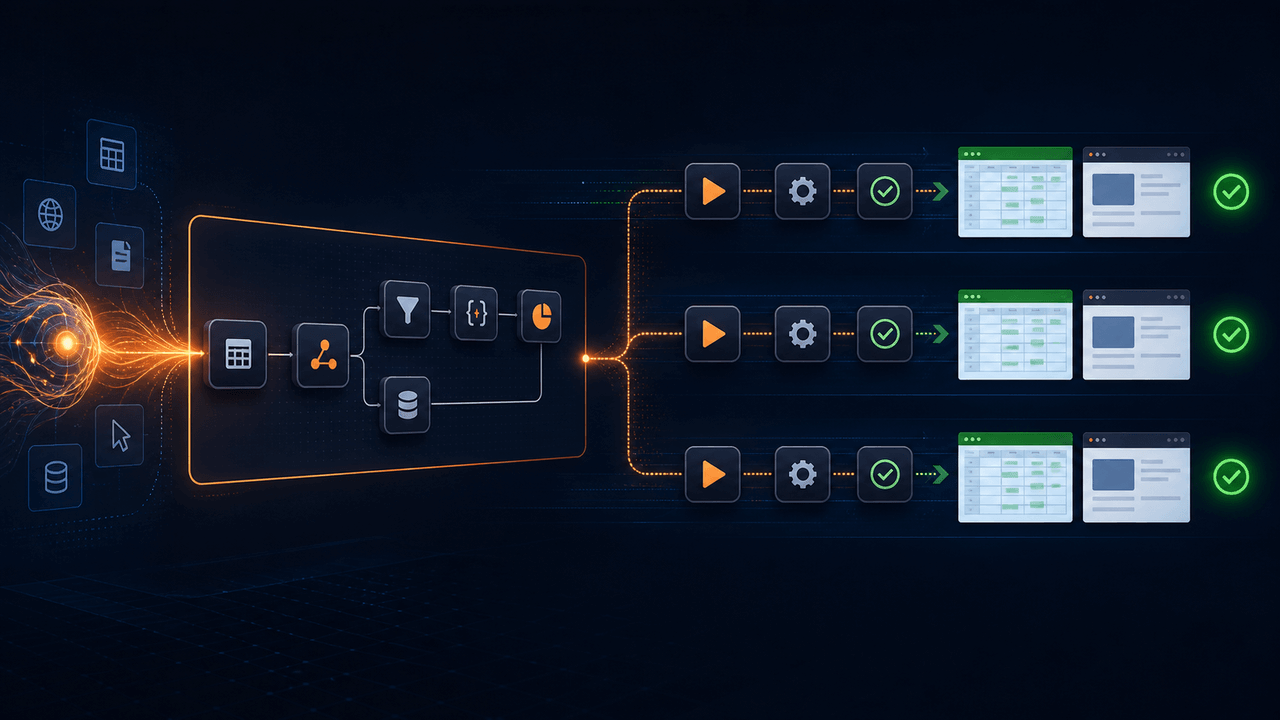
An AI model can be excellent at understanding a goal, exploring alternatives, and turning an ambiguous request into an automation plan. That does not mean the model should decide every browser click and spreadsheet write again whenever the task runs. When the work is already known, repeatedly asking a model to rediscover the same actions adds token consumption, latency, and behavioral variability without necessarily adding value.
A more practical architecture separates two phases. AI helps create, explain, revise, and troubleshoot a visual workflow. After a person approves that workflow, ordinary commands execute deterministically. The saved flow—not the chat transcript—becomes the operational artifact. Model calls remain available for steps that genuinely require interpretation, but they are explicit choices rather than an unavoidable cost of moving data from one place to another.
This article explains what "build once, run repeatedly" means, where the token savings come from, which tasks still benefit from a model, and how to test a workflow before depending on it.
Runavelo's AI visual workflow builder applies this separation between AI-assisted design and deterministic execution. For a broader architectural comparison, see AI Agents vs. Deterministic Workflows.
Key takeaways
- Separate AI-assisted workflow design from routine workflow execution.
- Do not call a model for steps whose behavior is already completely specified.
- Keep model-powered decisions explicit, bounded, logged, and testable.
- Treat the generated visual workflow as versionable operational logic, not disposable output.
- Reintroduce AI when requirements, interfaces, or failure evidence call for new reasoning.
Tokens are consumed by model requests, not by automation as a concept
Generative models process requests as tokens. A request normally includes instructions, conversation history, workflow context, tool descriptions, and user data; the response consumes output tokens as well. Google's Gemini documentation states that input and output are tokenized and that, when billing is enabled, call cost is determined in part by input and output token counts. It also exposes a token-counting API so developers can estimate prompt size. See Google's token guide and countTokens API reference.
Providers use different tokenizers, context limits, caching rules, and prices, so there is no universal conversion from a workflow run to a dollar amount. The important architectural fact is simpler: a deterministic browser command does not need a model request merely because AI helped create it. If a saved command already specifies the target webpage, element, click method, timeout, and next step, a local workflow engine can execute those instructions directly.
That is the basis of the token-saving claim. It is not "free AI" and it is not a promise that every automation consumes zero tokens. It means routine non-AI commands do not have to invoke a model on every run.
Building and running are different kinds of work
During design, a user might say:
Collect every product name and price from the current search results, continue until there is no next page, and save the data to Excel.
The request leaves open many decisions. The builder must identify repeated product cards, relate names and prices to each card, select data structures, design pagination, define a stopping condition, and create spreadsheet output. AI is valuable because the task contains ambiguity and requires composition across several command types.
Once the result is a reviewed workflow, execution is different. The approved flow might say:
- Get the current webpage.
- Locate product cards.
- Loop over the cards.
- read two child elements from each card.
- append a row to a list.
- click Next through CDP if it exists.
- write the final list to a workbook.
Those steps are operational instructions. The engine does not need a language model to reinterpret "what should happen next" after every card. Explicit conditions and loops already encode the decision.
Where repeated agent operation becomes expensive
Imagine a workflow that processes 500 records across 20 pages. An agent-driven design could send screenshots, DOM fragments, prior actions, tool definitions, and the current objective back to a model before many interactions. Even if each decision is individually affordable, repeated context accumulates. Longer histories can also add latency and make it harder to determine why the system chose a particular action.
A deterministic flow pays the reasoning cost primarily while the workflow is created or changed. The 500-record run then uses normal commands for the repetitive work. The exact savings depend on the model, prompt size, caching, and how the alternative agent is implemented, so responsible messaging should avoid a universal percentage. The durable advantage is that model usage scales with design and genuinely intelligent decisions rather than automatically scaling with every mechanical action.
This separation also improves budgeting. Teams can estimate how often users generate or repair workflows independently from how often workflows run. A daily report can execute every day without replaying the original design conversation.
Deterministic does not mean inflexible
The word deterministic is sometimes misunderstood to mean "hard-coded to one perfect screen." A well-designed workflow can still include variables, input parameters, loops, conditions, retries, timeouts, subworkflows, and data-driven branches. Its behavior changes when defined inputs or observed conditions change; the difference is that those transitions are specified and inspectable.
For example, a pagination flow can branch on whether a Next control exists. A data-cleaning flow can skip rows with no product name. A form workflow can select a route based on account type. None of those rules require a model when the condition and response are known in advance.
Determinism is about control: given the same relevant input and environment, the workflow follows the same declared rules. That makes command-level logs meaningful and allows a reviewer to ask what should happen before running the flow.
What should still use AI?
Some tasks are not reducible to fixed rules without losing their purpose. Use an explicit model-powered step when the workflow must interpret meaning or generate new content, such as:
- classifying free-form customer messages;
- extracting concepts from documents with unpredictable wording;
- drafting a response from supplied facts;
- comparing ambiguous descriptions;
- summarizing text whose structure is unknown;
- choosing among options that require semantic judgment.
Even then, isolate the model call. Define its input, required output schema, error handling, and acceptable confidence. Validate the response before it drives consequential actions. If a model classifies an email into a fixed set of categories, reject values outside that set rather than letting an unexpected sentence become a workflow command.
NIST's AI Risk Management Framework is intended to help organizations incorporate trustworthiness considerations into the design, development, use, and evaluation of AI systems. Its resources emphasize governance, testing, documentation, and human oversight rather than assuming a model response is automatically reliable. See the NIST AI RMF overview, the AI RMF FAQ, and the Generative AI Profile.
A practical hybrid architecture
A useful workflow platform can be understood as four layers.
1. Intent and assistance
The user describes a goal. AI reads supported command documentation and the current workflow, then proposes structured changes. The assistant can explain unfamiliar commands and ask questions when required details are missing.
2. Editable workflow model
The proposal becomes visible steps with explicit parameters, variables, conditions, and nesting. A person can change a selector, browser type, timeout, file path, or loop without rewriting the whole solution. This layer is the contract between natural-language intent and runtime behavior.
3. Deterministic runtime
The runtime executes approved commands. In Runavelo's open-source client, browser click, input, hover, and drag operations use the Chrome DevTools Protocol rather than the physical mouse. Spreadsheet commands manipulate workbook data. Basic control-flow commands determine sequence and branching. These operations do not require an AI request unless the workflow explicitly includes one.
4. Evidence and repair
Logs record command, line, timing, result, and failure details. If the environment changes, AI can inspect the durable workflow and the failed execution evidence, recommend a focused repair, and update the saved flow. The corrected workflow then returns to deterministic operation.
The loop is therefore design → review → run → observe → repair, not prompt → improvise every action forever.
How to calculate likely token use
Before choosing an architecture, model the two alternatives with realistic frequency.
For an agent-operated workflow, estimate:
- average input tokens per decision;
- average output tokens per decision;
- number of model decisions per record or page;
- number of records per run;
- number of runs per month;
- retries and failure-recovery calls.
For a generated deterministic workflow, estimate:
- initial generation requests;
- refinement and explanation requests;
- repair requests after failures;
- intentional model steps inside each run;
- average tokens for each of those calls.
Then apply the selected provider's current pricing and caching rules. Do not mix list prices from one model with token counts from another. Also measure latency: a design that saves a small amount of money but waits for hundreds of sequential model decisions may still be operationally unacceptable.
Keep estimates separate from measured usage. Once deployed, collect provider-reported input, output, and cached token counts where available. Compare those values with successful workflow runs and business outcomes, not merely the number of API calls.
Reliability benefits beyond cost
Token reduction is a useful headline, but repeatability creates broader advantages.
Reviewability
A visual flow shows what the system intends to do before it acts. Reviewers can inspect selectors, file destinations, loops, and branches. A prompt history alone is a weak substitute for an execution plan.
Testability
Each command has defined inputs and outputs. Teams can test empty lists, invalid enum values, timeouts, special characters, and missing elements. The same flow can be rerun against a known fixture after changes.
Diagnosability
A failure points to a command and line rather than only producing an agent narrative. Logs can be correlated with parameters, browser state, and output. AI can then reason from evidence.
Change control
The workflow can be versioned and reviewed. A targeted change to a Next-button selector is easier to understand than a broad prompt edit that may alter unrelated behavior.
Human control
Users can override a generated decision without learning the model's prompt language. Precise manual editing matters when automation is expected to run for weeks or months.
Failure modes the architecture does not eliminate
Deterministic execution is not automatically reliable. Websites change, credentials expire, network requests time out, files become locked, and data violates assumptions. A fixed workflow can repeat the same wrong action very efficiently if it was never tested.
Mitigate those risks with explicit validation:
- verify that the current page is the expected page before entering data;
- set meaningful element and navigation timeouts;
- stop if record counts or output fields are implausible;
- prevent an unbounded loop with a defensive maximum;
- make destructive or external actions require stronger checks;
- log sufficient context while excluding passwords, API keys, and sensitive content;
- rerun representative scenarios after every AI-generated modification.
NIST's guidance is relevant here because trustworthy use spans design, deployment, use, and evaluation. The model that generates the flow and the runtime that executes it are parts of one system and should be tested together.
A decision rule for every step
For each operation, ask: Does this step require new interpretation at runtime?
If the answer is no, encode it as a normal command, expression, condition, or lookup. If the answer is yes, define a bounded model call and validate the output. This simple rule prevents two opposite mistakes: paying a model to perform deterministic work and forcing ambiguous semantic work into brittle hand-written rules.
Examples:
| Task | Default implementation | Why |
|---|---|---|
| Click a known button | Deterministic CDP command | Target and action are already defined |
| Loop through rows | Deterministic loop | Repetition rule is explicit |
| Write values to Excel | Deterministic spreadsheet command | Output schema is known |
| Categorize an unpredictable message | Model step with a fixed output schema | Meaning must be interpreted |
| Generate a tailored summary | Model step with validation | New language is required |
| Retry after a timeout | Deterministic retry policy | Trigger and response are known |
Conclusion
AI automation does not need to choose between intelligence and control. Use a model where reasoning is valuable: understanding goals, composing workflows, explaining unfamiliar commands, analyzing failures, and handling genuinely semantic tasks. Preserve the result as an editable visual workflow. Execute ordinary approved commands directly, with clear logs and predictable control flow.
That architecture can reduce repeated token use because a model is no longer asked to rediscover settled decisions on every run. More importantly, it gives users a durable artifact they can inspect, test, change, and repair. Build with AI, run with deterministic commands, and bring AI back when the evidence shows that new reasoning is actually needed.
References
Turn a goal into an editable workflow.
Use AI to build, inspect, revise, and troubleshoot automation, then run the approved steps repeatedly.