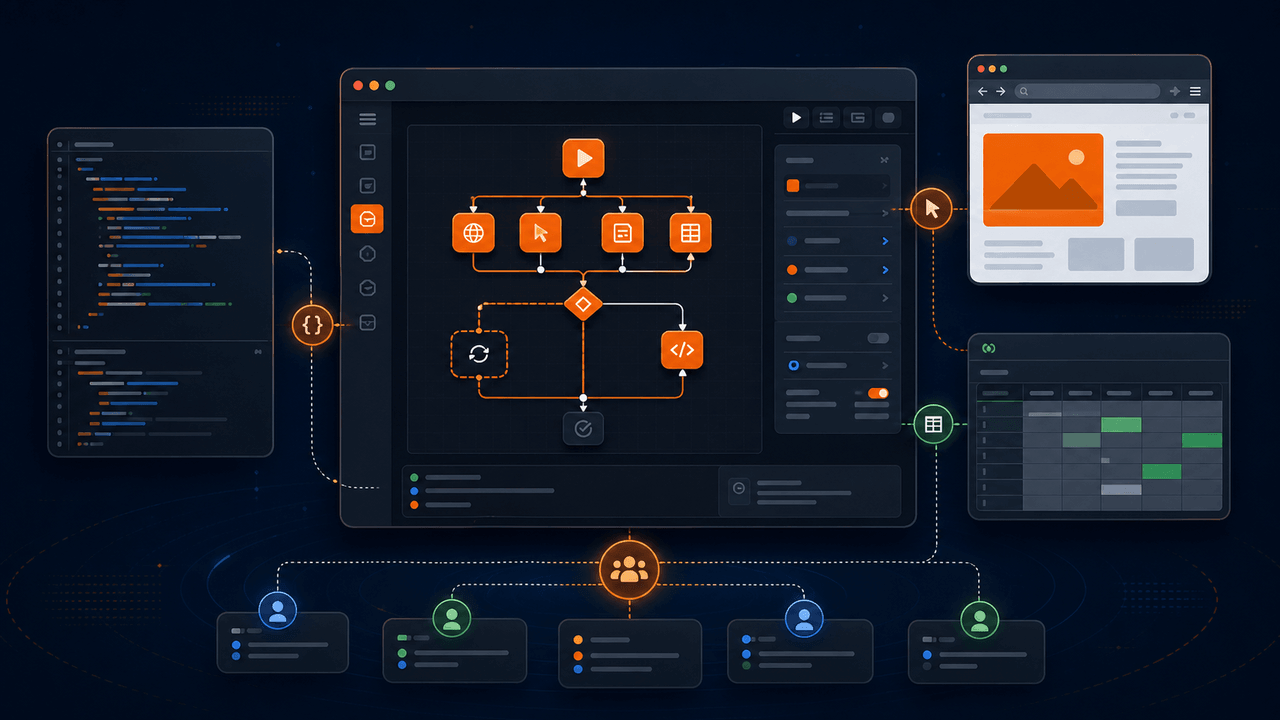
Runavelo Desktop combines an AI assistant with a visual workflow editor and a deterministic automation runtime. The open-source edition is available on GitHub for developers who want to inspect how natural-language goals become editable commands, understand how browser and spreadsheet operations execute, build the client locally, or contribute improvements.
Start with the Runavelo Desktop repository, review the AI workflow builder solution, or examine the web data to Excel workflow before building the client.
The project is deliberately more concrete than a collection of prompts or a code-generation demo. AI can generate a visual workflow, modify an existing workflow, explain commands, and analyze execution failures. The generated result remains a visible sequence of parameters, variables, conditions, loops, and operations that a person can edit precisely. Routine execution then follows the saved workflow without requiring a model to improvise every action again.
The repository is open source under the GNU General Public License version 3 (GPL-3.0). It represents a defined client edition, not a claim that every Runavelo service, integration, or commercial capability is included in the repository. This article explains what is available, how the architecture fits together, what GPL-3.0 means in practical terms, and how to evaluate the project responsibly.
Key takeaways
- Runavelo Desktop's open-source edition is published under GPL-3.0.
- It includes an editable visual workflow editor, AI-assisted building and troubleshooting, Chrome automation, spreadsheets, and basic control flow.
- Browser click, input, hover, and drag use Chrome DevTools Protocol operations rather than the physical mouse.
- The repository can connect to supported model protocols and custom model endpoints; API credentials remain a user responsibility.
- The open-source client and the complete Runavelo product have intentionally different scopes.
Why open an AI automation client?
Automation software asks users to trust consequential behavior. A workflow may read pages, enter data, collect records, and write files. When AI is involved, another layer of uncertainty appears: what exactly did the model generate, and will it make the same decision during the next run?
Publishing the client makes several important questions inspectable:
- How is a natural-language workflow represented?
- Which commands can the AI generate?
- How are required parameters and enum values validated?
- How does a visual step become executable Python?
- How are browser elements represented?
- What runtime evidence is available after failure?
- Where are model credentials stored and how are provider requests formed?
- Which features belong to the open-source edition?
Open source does not automatically prove security, correctness, or maintainability. It provides the ability to inspect, test, modify, and discuss the implementation. The Open Source Initiative emphasizes that open source is more than visible code: an open-source license must allow redistribution, access to source, modifications, and derived works without discrimination against people or fields of endeavor. See the Open Source Definition and the OSI license directory.
What is included in the open-source edition?
The current repository focuses on a coherent set of capabilities that can build useful local workflows without pretending to include every product feature.
Visual workflow editing
Commands appear as readable steps rather than only generated source code. A workflow can contain variables, input and output values, nested children, comments, and descriptions. Users can drag commands into the editor, reorder them, edit individual parameters, and inspect generated logic.
The visible model matters because AI output is rarely the final specification. A user may need to change a browser, correct a selector, adjust a timeout, add an output field, or limit a loop. Those should be local edits, not reasons to regenerate everything.
Basic control flow
The open-source command set includes sequence, conditions, count and collection loops, loop control, pauses, logging, and supported utility operations. These primitives are enough to express pagination, filtering, retries, data shaping, and multi-step browser-to-spreadsheet flows.
Chrome browser automation
The browser feature set includes opening and selecting webpages, locating captured or selector-based elements, retrieving related and repeated elements, interacting with controls, navigating, reading properties, working with cookies, observing downloads, and handling supported network-request operations.
Click, input, hover, and drag are CDP-only in the open-source edition. The Chrome DevTools Protocol allows tools to instrument Chromium-based browsers through structured domain commands. Its Input domain defines operations for dispatching mouse and keyboard events, inserting text, and handling drag-related input. Runavelo targets a browser tab through that protocol and does not move the user's physical mouse for these commands.
CDP interaction still depends on a valid page, correct element matching, and an unobstructed target. Open source makes those implementation choices visible; it does not turn changing websites into static interfaces.
Spreadsheet automation
Supported spreadsheet commands can create or open a workbook, read raw or displayed data, write tables, clear cells, manage worksheets, count rows and columns, and handle supported cell images. The implementation is based on openpyxl, a Python library for reading and writing Excel-compatible workbook formats. The openpyxl documentation and tutorial document workbook creation, cell operations, worksheets, loading, and saving, along with important limitations for complex existing files.
AI-assisted building, repair, and learning
The assistant can use the supported command documentation and workflow representation to build a flow from a goal. It can read an existing flow and make a targeted revision. When execution fails, it can combine the flow, parameters, logs, and error stack to help diagnose the cause. It can also explain how to build a workflow manually, step by step.
These are separate use cases. "Generate a workflow," "change this workflow," "why did this run fail?" and "teach me how to drag these commands" should not collapse into one generic chat behavior.
Configurable model access
The client supports multiple API protocol families and provider presets, including configurable endpoints and model names. Presets supply defaults; users can edit the fields needed for their chosen provider or compatible service. A multi-provider design reduces dependence on one model vendor and lets developers study the adapter layer.
Model support is not a guarantee that every model will perform equally well. Tool calling, context limits, JSON reliability, reasoning controls, and provider-specific parameters vary. Users should consult the current provider documentation, protect their API keys, and test a model against representative workflows before relying on it.
Why use GPL-3.0?
GPL-3.0 is a strong copyleft license. It permits people to use, study, modify, and redistribute the covered software, while requiring distributed modified versions and covered derivative works to preserve the same licensing freedoms and provide the corresponding source under the license's terms. It also contains provisions addressing installation information for certain user products and patent-related protections. Read the GNU GPL version 3 license and the GNU GPL FAQ before distributing a modified build.
In practical terms, GPL-3.0 keeps redistributed versions of the covered desktop client open under the same license. The repository's exact LICENSE file remains the source of truth for the applicable terms; this article is only a plain-language orientation.
This summary is informational, not legal advice. Anyone distributing modified software should read the actual license, preserve required notices, provide source and installation information where the license requires it, and obtain legal advice for their situation when necessary.
Open source edition versus complete product
Clear scope is part of trustworthy product communication. The GitHub repository includes the open-source desktop client and its supported local workflow capabilities. The complete Runavelo product can include additional packaged features, automation domains, services, integrations, distribution infrastructure, and commercial support that are not part of this repository.
The distinction does not reduce the value of the open-source edition. It tells developers what they can expect to build and inspect. It also avoids an "open source" label that obscures hosted dependencies or closed companion services.
When evaluating the repository, use the command list, license, README, source tree, and build instructions as the source of truth for the current edition. Product scope can evolve, so avoid relying on an old screenshot or an article sentence as a permanent API contract.
How the architecture works
At a high level, Runavelo Desktop connects four parts.
Svelte visual interface
The frontend presents the home screen, workflow editor, command option panels, element manager, runtime logs, and AI conversation interface. Command configuration classes translate between editable UI state, descriptive JSON used by AI, and code-generation inputs.
Electron desktop shell
Electron hosts the desktop application and bridges frontend actions to local functionality. Desktop applications based on Electron combine web content with privileged local capabilities, so boundaries and update practices matter. Electron maintains an official security checklist covering topics such as secure content, context isolation, sandboxing, permission handling, navigation limits, and IPC validation. Developers extending the client should review that guidance rather than treating frontend code as inherently trusted.
Python workflow runtime
Supported visual commands generate Python operations. The runtime manages variables, control flow, browser objects, elements, logging, and spreadsheet operations. This design makes generated behavior inspectable at both the workflow and execution layers.
Browser extension and native bridge
The Chrome extension identifies browser state and webpage elements, while the bridge connects the runtime to browser operations. CDP commands target the relevant tab. Version compatibility between the client, extension, and bridge is therefore an operational requirement.
A good first workflow
A browser-to-spreadsheet task exercises the main open-source capabilities without requiring an external business system.
- Open a permitted results page in Chrome.
- Ask AI to collect product names and prices across all result pages.
- Review the generated webpage, element, loop, and workbook commands.
- Inspect the captured product-card and Next-button locators.
- Run against one page first.
- Add logs for page number and collected-record count.
- Test pagination and the final no-next-page condition.
- Open the resulting workbook and validate headers, values, and row count.
- Introduce a safe selector error and ask the assistant to diagnose it from the workflow and logs.
- Review the proposed change and rerun before accepting it.
This exercise demonstrates the central product idea: AI accelerates creation and repair, but the user retains an editable workflow and observable runtime.
How to evaluate the project before adopting it
Open source enables due diligence; it does not perform it for you. Review the following areas in the context of your intended use.
License and dependency notices
Read the repository license and notices. Identify third-party dependencies and their licenses. Understand the obligations that apply if you distribute a modified client.
Build reproducibility
Follow the documented setup using a clean environment. Record tool versions. Run unit tests and a production build. Compare generated artifacts with the expected packaging process.
Security boundaries
Inspect how API keys are stored, which URLs the client can access, how Electron IPC is validated, what the browser extension can read, and how updates are obtained. Never insert production credentials into an unreviewed development build.
Workflow validation
Test valid, missing, empty, oversized, and malformed parameters. Confirm that unsupported commands and obsolete enum values are rejected rather than silently translated into unexpected behavior.
Operational failure
Disconnect the browser extension, close a page during a run, change a selector, lock an output file, and simulate slow loading. Useful automation should report actionable failures and preserve enough evidence for diagnosis.
Ways to contribute
Contributions do not need to begin with a large feature. High-value work can include:
- a reproducible bug report with logs and a minimal workflow;
- documentation corrections and clearer examples;
- tests for serialization, code generation, and edge cases;
- accessibility and keyboard-navigation improvements;
- selector resilience and browser compatibility fixes;
- model-adapter tests for provider-specific behavior;
- security reviews with focused, responsible reports;
- translations that preserve exact command and enum names.
Before changing code, review the repository's current contribution guidance and open issues. Keep pull requests focused, explain the user-visible behavior, and include tests proportional to the risk.
Conclusion
Runavelo Desktop's open-source edition provides an inspectable foundation for AI-assisted visual automation. It combines a Svelte editor, Electron shell, Python runtime, Chrome integration, spreadsheet support, and configurable model access. AI can build, revise, explain, and troubleshoot workflows, while the saved visual flow remains editable and ordinary commands run deterministically.
GPL-3.0 preserves the freedom to inspect, modify, and redistribute covered versions of the open-source client under the license's terms. The complete Runavelo product has a wider scope, and the distinction is explicit.
Visit the Runavelo Desktop repository on GitHub, read the README and license, build the client, and test a small workflow. The strongest reason to use an open automation client is not that every answer is already visible; it is that developers can inspect the implementation, challenge assumptions, verify behavior, and improve it.
References
Turn a goal into an editable workflow.
Use AI to build, inspect, revise, and troubleshoot automation, then run the approved steps repeatedly.