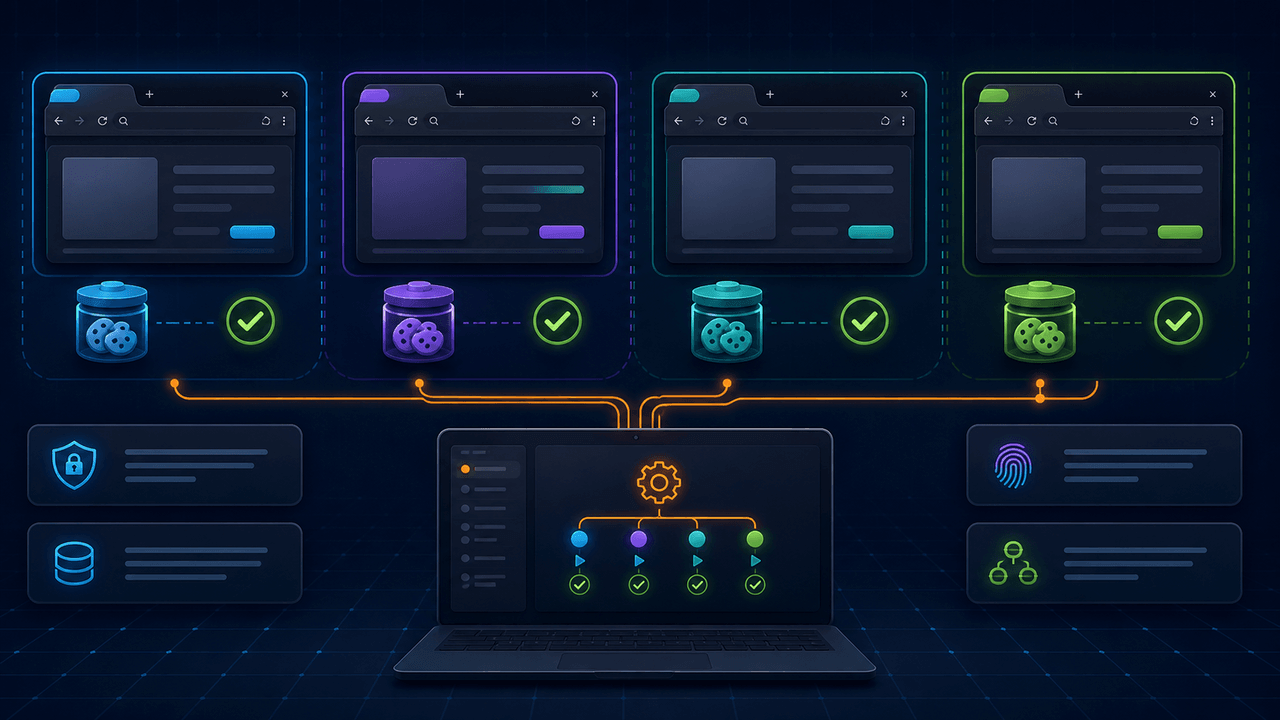
Parallel browser automation can shorten a large job, keep independent sessions separate, and let background work continue without taking over the browser a person is using. It can also multiply every weakness in a workflow. A selector that occasionally fails becomes many failures. Shared cookies contaminate accounts. Unbounded concurrency overwhelms the computer or the target service. Missing logs make several simultaneous failures almost impossible to reconstruct.
The useful question is not “Can the software open ten browsers?” It is “Can ten independent units of work run with controlled state, load, evidence, and recovery?” This guide explains the design decisions behind reliable multi-browser automation and shows where Runavelo's visual workflow model fits.
The parallel browser automation solution summarizes Runavelo's session-isolation and background-execution capabilities. For workflows that extend beyond the browser, see local desktop automation.
Parallel tabs are not necessarily isolated sessions
Opening several tabs in one normal browser profile creates concurrency, but the tabs commonly share cookies, local storage, permissions, and other state. That may be correct for one account navigating several pages. It is unsafe when each unit of work requires a separate login, region, customer, or test identity.
Browser contexts provide a stronger boundary. Playwright describes a BrowserContext as an incognito-like profile with its own cookies, local storage, and session storage. Its testing documentation uses a separate context to prevent state leaking between tests. Chrome DevTools Protocol exposes browser-context creation and lets a target be created inside a selected context. The protocol also supports creating a target in the background.
These details matter outside testing. If task A signs in as Account A and task B signs in as Account B, accidental shared state can send data to the wrong destination. A visual workflow should make the intended session boundary visible rather than treating “open another tab” as equivalent to “create another identity boundary.”
Choose the right unit of parallel work
Before adding concurrency, decide what one independent job means. Typical units include:
- one account;
- one geographic region;
- one search query;
- one input file;
- one customer record batch;
- one website or portal;
- one pagination range.
Each unit needs its own inputs, browser state, output, and status. If the work cannot be described as independent units, parallel execution may introduce ordering problems. For example, two sessions should not update the same spreadsheet cell or claim the same queue item without coordination.
Start with a sequential workflow that is correct. Then isolate the repeatable body as a subworkflow and provide an explicit input object. Parallelism should change scheduling, not the meaning of the steps.
A reference workflow structure
Consider a permitted data-collection task across several product categories. A reliable design may look like this:
- Read category jobs from a spreadsheet or list.
- Validate that each job contains a URL, output identifier, and stopping rule.
- Limit the number of concurrently active jobs.
- For each admitted job, create or select an isolated browser session.
- Open the category URL and wait for a stable page condition.
- Collect records from the current page.
- Validate and de-duplicate records within the job.
- Continue pagination until the declared stop condition is met.
- Write to a job-specific result buffer.
- Close the session and merge verified results through one controlled output step.
The merge stage avoids concurrent writes corrupting a shared file. A database or queue can support safe concurrent writes when designed for them, but a local workbook is often simpler to write once after workers finish.
Concurrency is a budget, not a maximum button
The correct concurrency level depends on several independent limits:
- available memory and CPU;
- browser rendering and JavaScript load;
- network bandwidth and connection limits;
- target-service capacity and published rate limits;
- authentication or account rules;
- downstream write capacity;
- acceptable recovery cost when several jobs fail together.
Begin with a small fixed limit and measure completed jobs, latency, memory, error rates, and server responses. Increase only while results remain stable. An eight-core computer does not imply eight browser jobs are safe; one page may be light while another uses large scripts, media, or client-side rendering.
Use backpressure. If three jobs are active and the configured limit is three, the fourth waits rather than creating another browser immediately. Backpressure turns a burst of 500 inputs into a controlled queue instead of a resource spike.
Stable interaction beats coordinate automation
Background browser automation should not depend on the physical mouse or foreground window. A click at screen coordinate 800, 450 can hit a different window, move when the layout changes, or interfere with the user's work.
Runavelo's supported web interaction subset uses Chrome DevTools Protocol for click, input, hover, and drag operations. The target is a browser element within a controlled page rather than a global mouse position. That makes isolated background sessions technically meaningful.
Selectors still need care. Prefer stable attributes or relationships over transient text, generated class names, or page-specific values. A captured Next button whose accessible label contains “page 2” may work on page one and fail on page two when the label changes to “page 3.” The repair is not a longer delay; it is removing the unstable page number from the locator while preserving attributes that uniquely identify the control.
Wait for conditions, not arbitrary time
Parallel execution increases timing variation. A fixed two-second delay that works sequentially may fail when several pages compete for CPU and bandwidth. Replace arbitrary sleeps with observable conditions where possible:
- document or target readiness;
- appearance of a required result container;
- disappearance of a loading indicator;
- a minimum count of repeated items;
- a URL or page-state change after navigation;
- a bounded timeout with a meaningful error.
A timeout should describe what did not happen. “Product card collection did not appear within 30 seconds” is more useful than “Step failed.” Capture the workflow line, session identifier, URL, and relevant selector so a failed worker can be diagnosed independently.
Design pagination as a state machine
Pagination deserves explicit states:
- collect the current page;
- validate the page result;
- determine whether a next page exists;
- preserve current-page identity;
- invoke navigation;
- confirm that page identity changed;
- continue or stop.
This prevents infinite loops where the Next click fails silently and the workflow repeatedly collects the same page. Keep a maximum-page guard even when “until no Next button” is the business rule. Store a stable page identity such as URL, cursor, or first-record signature and stop with an error if it does not change after navigation.
For multiple workers, keep page state inside each job. A global currentPage variable shared by several sessions will produce misleading logs and stopping decisions.
Logging must identify the worker
Parallel logs need correlation. Every entry should include a job or session identifier in addition to time, workflow, line, level, and message. Useful events include:
- job admitted to the concurrency pool;
- browser context created;
- authentication completed;
- page N started and completed;
- records collected, rejected, or de-duplicated;
- navigation attempted and confirmed;
- retry number and reason;
- final output path or record count;
- browser context closed.
Do not log passwords, access tokens, full session cookies, or unnecessary personal data. Logs are evidence, but evidence collection should follow data-minimization and retention rules.
Retry narrowly and preserve the root cause
A retry is appropriate for a bounded transient condition, such as a network timeout or temporarily unavailable page element. It is not a substitute for an invalid selector, expired credential, or permission denial.
Classify failures before retrying:
- transient: timeout, connection reset, temporary service response;
- data-specific: missing required field, unexpected format;
- workflow defect: invalid selector, wrong branch, incorrect variable;
- authorization: expired login, denied access;
- policy: rate limit or explicit block.
Use exponential or increasing delays for transient failures and honor server guidance such as Retry-After. Cap attempts. Keep the first error and every retry outcome so the final message does not erase the original evidence.
Responsible access is part of reliability
Automation must follow the target service's terms, account permissions, applicable law, and technical access controls. The IETF Robots Exclusion Protocol standard, RFC 9309, specifies how crawlers can retrieve and interpret robots.txt. The standard also states that robots rules are not access authorization and are not a substitute for security controls. In other words, reading robots guidance is responsible, but it does not grant permission to access restricted data.
Rate control is also an engineering requirement. Aggressive concurrency can trigger service protection, damage account reputation, and produce incomplete data. Prefer documented APIs when they provide the needed result. For browser-only tasks, make request volume predictable, stop on explicit denial, and avoid circumventing access controls.
How AI helps without controlling every run
AI can create the initial visual structure: job list, concurrency limit, isolated browser launch, pagination loop, data validation, and output merge. A user can then inspect exact inputs, commands, and stopping conditions.
When a worker fails, Runavelo's assistant can use the workflow, command parameters, logs, and error stack to reason about the cause. It may identify a page-specific selector, an incorrectly scoped variable, or a missing readiness check. The proposed repair remains a visible workflow change.
After approval, ordinary steps run deterministically. They do not consume model tokens merely because AI helped design them. A model request occurs when the assistant is used or when the workflow intentionally contains an AI command.
Test matrix before scaling
Test these cases sequentially first and then at the intended concurrency:
- valid job with one page;
- valid job with several pages;
- final page with no Next control;
- empty results;
- optional field missing;
- authentication expiry;
- navigation that leaves the URL unchanged;
- duplicated input jobs;
- output path already exists;
- one worker fails while others succeed;
- application shutdown while jobs are active;
- concurrency limit lower than queue length;
- target returns a rate-limit or denial response.
Verify resource cleanup after both success and failure. Browser contexts that remain open after a failed job can consume memory and retain credentials longer than intended.
Runavelo's parallel-browser fit
Supported Runavelo editions can control multiple independent browser sessions on one Windows computer, including background sessions. The visual workflow can combine those browser tasks with spreadsheet, file, API, Python, JavaScript, desktop application, and connected Android steps available in the edition.
This does not make unlimited parallelism safe. The workflow designer still chooses the concurrency cap, identity boundary, target permissions, rate policy, merge strategy, and recovery rules. Runavelo's value is making those decisions visible and editable, while letting the runtime repeat approved operations without a fresh AI decision at each interaction.
References
Turn a goal into an editable workflow.
Use AI to build, inspect, revise, and troubleshoot automation, then run the approved steps repeatedly.