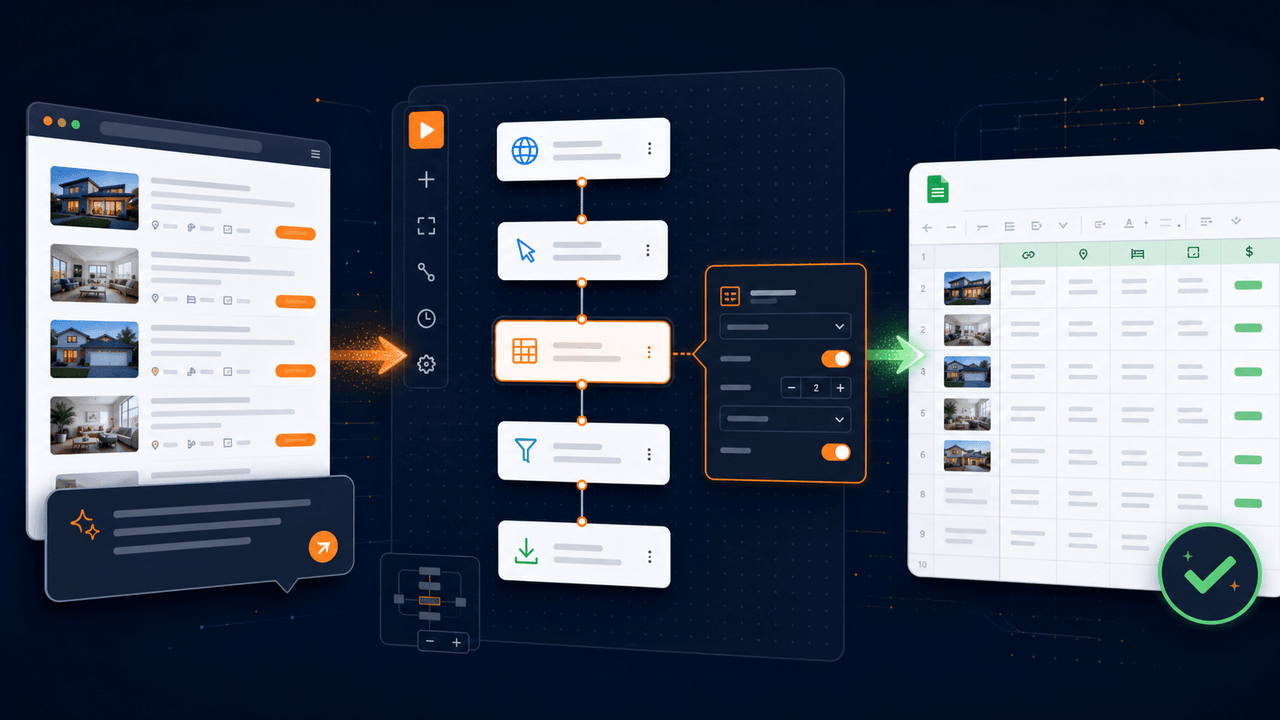
AI can shorten the path from an automation idea to a working browser workflow, but speed is only useful when the result remains understandable. A chat response that contains a long script may look impressive and still leave the user unable to verify selectors, adjust pagination, change the output format, or diagnose a failure. An editable visual workflow takes a different approach: AI proposes concrete commands, and the user retains control over every browser action, variable, condition, loop, and spreadsheet operation.
This guide explains how to design that kind of automation. The running example collects product names and prices from a multi-page results list and saves them to an Excel workbook, but the same method applies to research, inventory checks, order-status monitoring, form entry, and internal reporting. Automate only systems you are authorized to use, respect access controls and applicable terms, and never treat automation as permission to bypass a site's safeguards.
Explore the AI browser automation solution for the product capabilities behind this approach, or open the web data to Excel workflow for a concrete end-to-end example.
Key takeaways
- Define the desired result, source, fields, and stopping condition before asking AI to build anything.
- Require the generated result to expose real commands, parameters, variables, and control flow.
- Treat element locators as maintainable data rather than permanent facts about a website.
- Test pagination, empty states, duplicates, timeouts, and output integrity before scheduling repeated runs.
- Use AI to build and repair the workflow while keeping routine execution deterministic and reviewable.
Start with an outcome, not a recording of clicks
A weak automation request describes gestures: click here, scroll down, copy this, and paste it there. Those instructions encode one observed route through the interface but omit the business rule. A better request describes the result and the constraints:
Collect each product name and displayed price from the currently open search-results page. Continue through every available results page. Remove rows without a product name, preserve the price as displayed, and save the data to an Excel file with
Product NameandPricecolumns.
This prompt identifies five things the workflow must make explicit: the starting page, the repeated record, the required fields, the termination rule, and the output contract. It also leaves implementation choices—such as list variables, element relationships, waits, and loop structure—to the builder.
Before generation, clarify questions that would materially change the workflow. Should the process stop after a fixed page count? Is a missing price acceptable? Should duplicate products be removed by name, URL, or a stable product identifier? Can the target page load additional records after scrolling? What should happen if a login expires? A useful AI assistant should expose these assumptions instead of silently inventing them.
What an editable generated workflow should contain
For the product example, a reasonable visual flow contains recognizable operations rather than an opaque block of generated code:
- Obtain the currently open webpage.
- Create collections for the output fields.
- Find the repeated product-card elements.
- Loop through the cards.
- Find the name and price elements relative to the current card.
- Read and normalize their values.
- Append a row to the output data.
- Check for a next-page control.
- Navigate, wait for the new results, and repeat.
- Create or open a workbook, write the table, and save it.
Each step should show its inputs and outputs. A user must be able to see that productCards is a list, card is the current item, and nameElement belongs to the current card rather than the whole page. The loop boundary and next-page condition should be visible. If a command returns a webpage object or a web element, later commands should reference that object directly rather than depend on an invisible global state.
This structure makes review possible. It also gives AI a durable artifact to modify later: "change the browser type," "add the product URL," or "stop after five pages" can become targeted edits instead of complete regeneration.
Use CDP browser actions without taking over the physical mouse
Runavelo's open-source browser click, input, hover, and drag commands use the Chrome DevTools Protocol (CDP). CDP exposes browser instrumentation as structured commands, and its official Input domain includes mouse-event dispatch, keyboard-event dispatch, text insertion, and drag-related operations. See the Chrome DevTools Protocol overview and the Input domain reference.
The practical distinction is important. A physical mouse action competes with the person using the computer and generally depends on the browser being visible and unobstructed. A CDP action is sent to a specific browser tab. It does not move the user's physical pointer or type through the operating-system keyboard. That makes CDP actions suitable for workflows that must remain in the background or operate independent tabs concurrently.
CDP is not magic. The element still needs to exist, be located correctly, and be in a state where the page can respond. Overlays, disabled controls, unexpected frames, navigation, or a changed DOM can still cause failure. The open-source client therefore exposes CDP as an execution mechanism, not as a promise that every website will behave identically.
Treat selectors as maintainable data
Most browser automation failures are not caused by the loop itself. They come from an element locator that was too broad, too narrow, or based on an attribute that changed.
Suppose the Next button on page one has aria-label="Go to next page, page 2". After navigation, the equivalent button may say aria-label="Go to next page, page 3". The label is meaningful to accessibility software—MDN explains that aria-label can define an element's accessible name—but its page number makes an exact locator fragile. See MDN's aria-label reference and accessible-name overview.
A resilient locator combines properties that express identity without capturing volatile state. Depending on the page, those may include:
- semantic role and stable visible text;
- a stable
id,name, ordata-*attribute; - a relationship to a known parent card or section;
- a stable class used specifically for the control;
- an accessible name after removing variable content;
- a CSS selector or XPath scoped to an appropriate container.
Do not assume that a selector is robust because it worked once. The W3C WebDriver specification defines a stale element reference as a node that is no longer attached to the current browsing context's DOM. Although Runavelo uses its own browser integration, the underlying lesson is general: navigation and dynamic rendering can invalidate prior element state. The WebDriver specification is a useful reference for common interaction and element-state concepts.
Build pagination as a state transition
Pagination is more than clicking Next in a loop. The workflow must prove that the page advanced and know when to stop. A reliable sequence is:
- Record a page marker, URL, or representative result before clicking.
- Check whether the next-page control exists and is enabled.
- Scroll the control into view if necessary.
- Click it through CDP.
- Wait until the marker, URL, or result set changes.
- Collect the new page only after that condition succeeds.
This avoids two common errors. First, a fixed sleep may be too short on a slow run and unnecessarily long on a fast one. Second, a click can be accepted without producing a navigation, causing the workflow to collect the same page repeatedly.
Add a defensive maximum-page limit even when the normal stopping rule is "no next page." The limit protects against a selector that accidentally matches a different control or a site that cycles URLs. Log the page number, records collected on that page, running total, and final stop reason. Those values turn an ambiguous failure into a traceable state transition.
Validate data before writing the workbook
The number of located cards does not guarantee the same number of valid names and prices. A page may contain sponsored blocks, placeholders, unavailable products, or cards with a different layout. Keep fields associated with the current card and construct a row only after validating the required values.
Define the output contract before writing:
- Are prices stored as displayed strings or normalized decimals?
- Must currency symbols and locale-specific separators be preserved?
- How are missing values represented?
- What key defines a duplicate?
- Should the source URL and collection timestamp be included?
- Is the workbook replaced, appended, or versioned?
Runavelo's spreadsheet operations use ordinary workbook structures so the result remains portable. The openpyxl documentation describes creating worksheets, assigning cell values, appending rows, and saving .xlsx files. Its tutorial also warns that saving can overwrite an existing file and that not every possible Excel object is preserved when an existing workbook is opened and saved. Review the openpyxl tutorial when a workflow modifies complex pre-existing workbooks.
Test the workflow as a small system
One successful run is a demonstration, not adequate validation. Test scenarios that represent how the target actually changes:
Normal cases
- one page with several complete records;
- multiple pages with different record counts;
- the final page with no Next control;
- repeated execution that creates the expected file each time.
Boundary cases
- an empty results page;
- one card or one page;
- a missing optional price;
- duplicated records across page boundaries;
- unusually long names or non-ASCII text;
- a slow page that approaches the configured timeout.
Failure cases
- browser integration unavailable;
- login redirected to an authentication page;
- target element covered by a modal;
- selector changed after a website update;
- workbook path unavailable or file locked;
- navigation succeeds but the result content does not change.
For each test, define the expected log event, stop behavior, and output. A workflow should fail with a specific reason rather than continue with silently corrupted data.
Use AI for targeted revisions and diagnosis
Once the workflow exists, further prompts should operate on the visible flow. Useful requests include:
- "Add the product URL as a third column."
- "Stop after three pages during testing."
- "Replace the fixed delay with a wait for the first result card."
- "Explain why line 30 could not find the Next button."
- "Repair the locator without changing the spreadsheet output."
For troubleshooting, provide the assistant with the current workflow, relevant command parameters, recent logs, error stack, and captured element metadata. Do not send secrets merely because they exist in the runtime context. AI should identify the failing step, explain the evidence, propose a narrow change, and ask for or perform a rerun that verifies the repair.
This division of responsibility is the core benefit of editable AI automation. AI accelerates design and investigation; deterministic commands produce the repeatable run; the user can inspect and modify both the intent and the implementation.
A practical readiness checklist
Before promoting a browser workflow from a prototype to repeated use, confirm the following:
- The starting page and required authentication state are explicit.
- Every output field is tied to the correct repeated record.
- Selectors avoid known session IDs, page numbers, and generated values.
- Navigation waits for a meaningful change rather than only sleeping.
- Pagination has both a normal stop condition and a defensive limit.
- Empty, missing, duplicate, and non-ASCII data have defined behavior.
- Logs include page, line, record counts, duration, and stop reason.
- Output paths, overwrite behavior, and workbook limitations are understood.
- A person can edit every generated command and parameter.
- The workflow has been rerun after its latest AI-assisted repair.
Conclusion
The most useful AI browser automation is not the one that produces the longest script or performs the flashiest live demonstration. It is the one that converts intent into a durable, inspectable workflow. Clear requirements give AI a sound target; visible commands make review possible; stable selectors and explicit state transitions improve reliability; logs and structured output make results verifiable.
Runavelo is designed around that lifecycle: describe a goal, generate a visual flow, edit any step, run deterministic commands, and bring AI back when the task or website changes. The result is automation that remains understandable after the original conversation has ended.
References
Turn a goal into an editable workflow.
Use AI to build, inspect, revise, and troubleshoot automation, then run the approved steps repeatedly.